Forms - field not marked as required but front end thinks it is
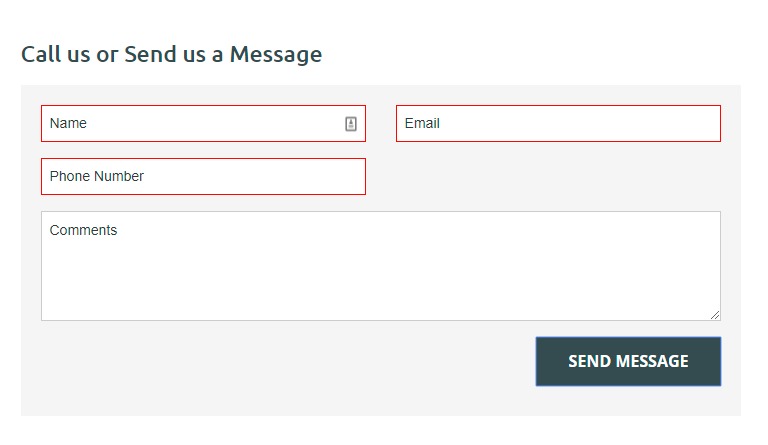
Our contact form phone number field is not ticked as 'required' in form edit screen but form won't submit if it's not filled in -- it displays a message, "false", then highlights all required input fields in red, which includes the phone number field.
Log in to comment and vote
Comments8
Nov 21, 2019
Peter Monk
Nov 21, 2019
Thanks Dean, this is for jimstrim.com.au. And no, we are overriding the layout.
Matt Walter
Nov 21, 2019
Peter Monk: You just need to remove the class
requiredfrom your custom layout. We don't touch custom layouts at all when updating forms.Peter Monk
Nov 21, 2019
Matt Walter: OK, thanks. So once we switch to a custom layout, the form edit screen is no longer usable -- all changes must be made directly in the code editor?
And if so, does that apply to all custom layouts everywhere?
Matt Walter
Nov 21, 2019
Peter Monk: Form Builder isn't just building layouts, it's building infrastructure behind them, like databases and server-side validation.
If you're using custom layouts, we can't simply update them for you, as we don't know what structure/guidelines to follow. For example, if you add a field, we don't know how or where to insert that field in a custom layout. However, we do know with a default layout, as it's our predefined structure.
If you simply edit the layout, and don't use Form Builder at all, then the data entered won't save against any case/user in the system.
Peter Monk
Nov 21, 2019
Matt Walter: Sure thing, thanks for the explanation, much appreciated.
Peter Monk
Nov 21, 2019
Problem seems to be:
Form edit screen should refer to overriding .liquid file to work out what's required.
Dean Vizer
Nov 21, 2019
Peter Monk which site is this for? Also is that the default layout?
If not, the HTML in the custom layout might not have been manually updated to remove required status